> ## Documentation Index
> Fetch the complete documentation index at: https://ade-ac1c6011-dependabot-github-actions-actions-cache-6.mintlify.site/llms.txt
> Use this file to discover all available pages before exploring further.
# Agent chat
> Talk to a coding agent that reads, edits, runs commands, and opens PRs — all scoped to one lane's worktree.
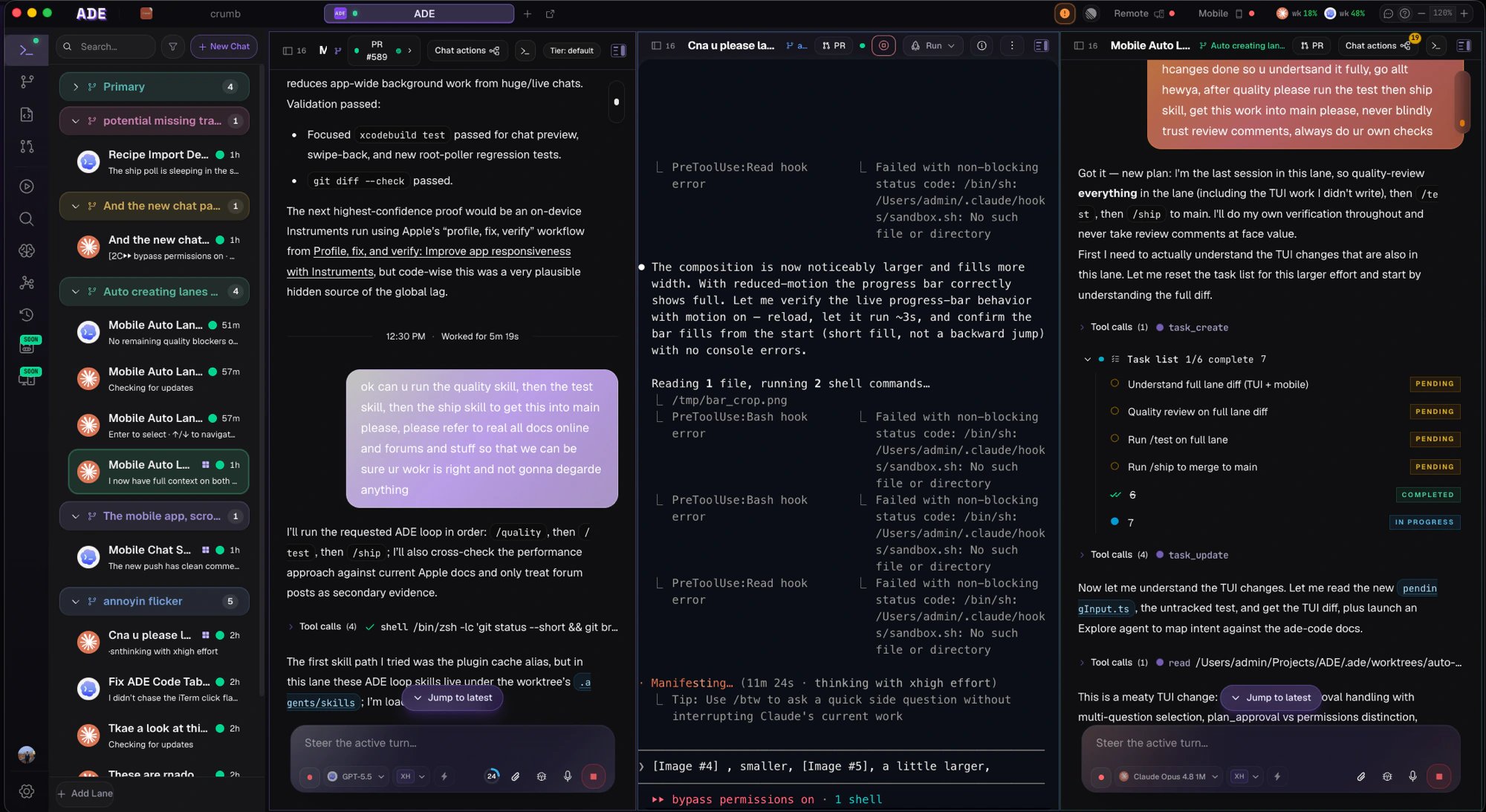
Agent chat is ADE's interactive coding surface. You open a chat in a lane, describe the task, and the agent reads and edits files, runs commands, inspects diffs, commits, and opens PRs — all inside that lane's git worktree. Every tool call streams into the transcript and is expandable, so you can inspect each edit or command before you trust it.
 ## Lane-scoped by design
Every chat binds to a lane — a git worktree and branch — and that worktree is the agent's boundary. The lane's branch and working directory are injected into the agent's context, so it always knows where it is. File edits and mutating commands stay inside the lane's worktree; the agent can read outside it for context when it needs to, but it writes only inside the lane unless ADE relaunches it elsewhere.
Because work is isolated per lane, several agents can run in the same repository at once without writing over each other or your primary checkout.
## Start a chat or a CLI session
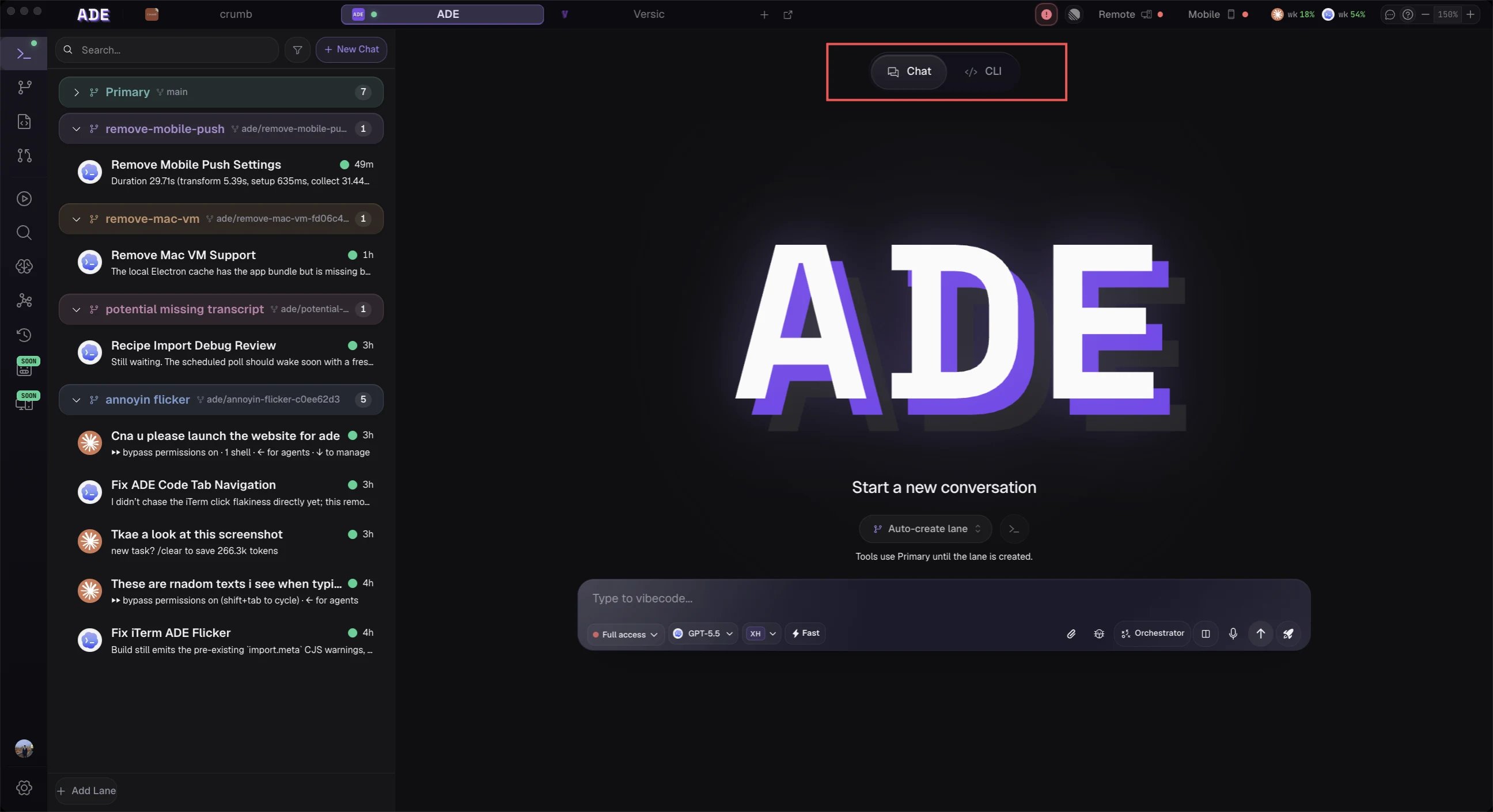
From an empty Work composer you can launch into an existing lane, or let ADE auto-create a worktree from your prompt. In a lane you can start either an **agent chat** (the streaming, tool-aware surface) or a provider **CLI session** (the provider's own terminal client) — both run scoped to the lane's worktree.
## Lane-scoped by design
Every chat binds to a lane — a git worktree and branch — and that worktree is the agent's boundary. The lane's branch and working directory are injected into the agent's context, so it always knows where it is. File edits and mutating commands stay inside the lane's worktree; the agent can read outside it for context when it needs to, but it writes only inside the lane unless ADE relaunches it elsewhere.
Because work is isolated per lane, several agents can run in the same repository at once without writing over each other or your primary checkout.
## Start a chat or a CLI session
From an empty Work composer you can launch into an existing lane, or let ADE auto-create a worktree from your prompt. In a lane you can start either an **agent chat** (the streaming, tool-aware surface) or a provider **CLI session** (the provider's own terminal client) — both run scoped to the lane's worktree.
 ## Pick a provider and model per session
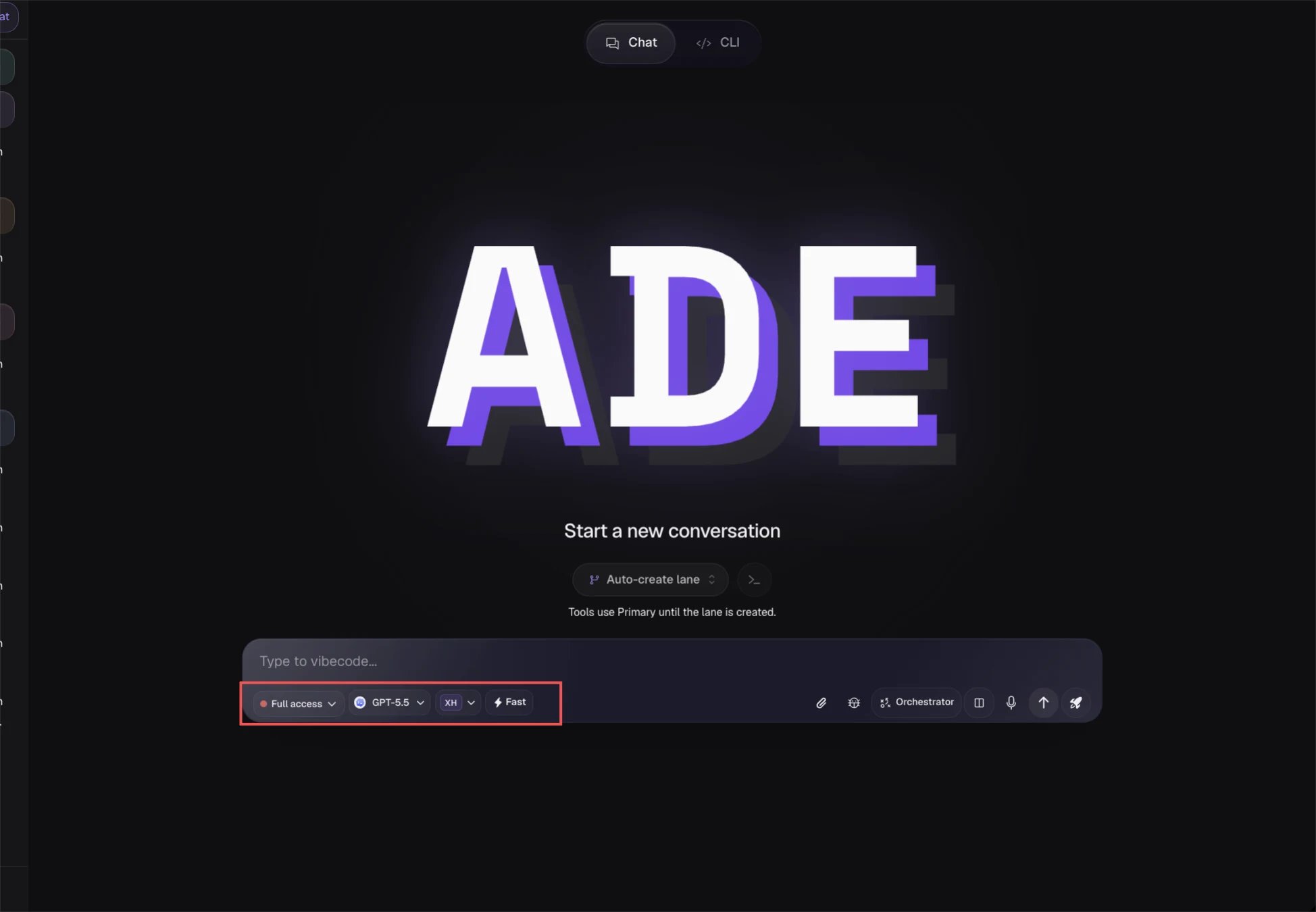
ADE runs five coding agents against the same lane. Pick the provider and model that fits the task when you start the session, and switch within the same family mid-session when you want a different model.
## Pick a provider and model per session
ADE runs five coding agents against the same lane. Pick the provider and model that fits the task when you start the session, and switch within the same family mid-session when you want a different model.
 | Provider | Runtime |
| ----------------- | -------------------------------------------------------------------------------------------------------------- |
| **Claude Code** | The bundled Claude Agent SDK — no separate install needed. |
| **Codex** | The `codex` app-server, resolved from PATH, the app bundle, or a configured install. |
| **Cursor** | The official `@cursor/sdk`, authenticated through the SDK. |
| **Factory Droid** | The official `@factory/droid-sdk`, resolved from PATH, the app bundle, or a configured install. |
| **OpenCode** | The OpenCode server runtime, routing your provider API keys, OpenRouter, or a local model (Ollama, LM Studio). |
Add a provider key or subscription in **Settings** before its models appear in the picker. Claude, Codex, Cursor, and Droid can also be installed and signed in from an inline card in the chat when their CLI is missing or unauthenticated.
## See every tool call
Chat is not a black box. As the agent works, ADE streams each step into the transcript so you can follow — and stop — what it does:
* Streaming assistant text and reasoning.
* Tool calls and shell commands, grouped into an expandable work log so you can read each file edit or command and its result.
* File changes mirrored into **Files** as a diff, with a per-turn diff summary.
* Questions when the agent needs a decision instead of guessing — the composer locks until you answer or decline.
Approval gates depend on the session's permission mode: a read-only **plan** mode proposes changes without touching files, while edit and full-auto modes let writes and commands through (with post-hoc review when the session is interactive).
## The same chat, every surface
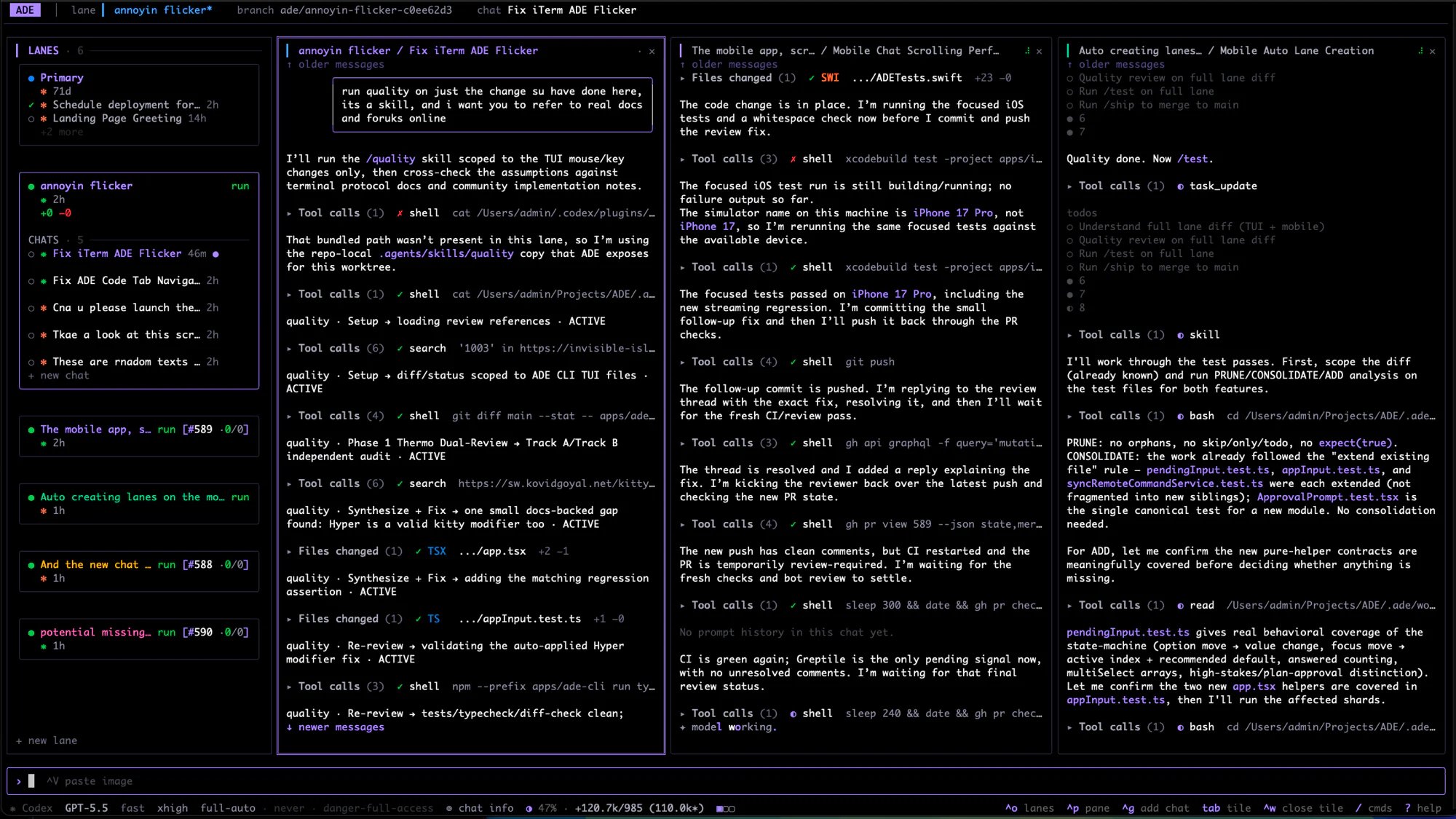
Chat sessions are owned by the machine's runtime, not by any one client. A chat you start on the desktop is the same conversation in the terminal and on your phone — the renderer, `ade code`, and the iOS app are all clients of the same session.
| Provider | Runtime |
| ----------------- | -------------------------------------------------------------------------------------------------------------- |
| **Claude Code** | The bundled Claude Agent SDK — no separate install needed. |
| **Codex** | The `codex` app-server, resolved from PATH, the app bundle, or a configured install. |
| **Cursor** | The official `@cursor/sdk`, authenticated through the SDK. |
| **Factory Droid** | The official `@factory/droid-sdk`, resolved from PATH, the app bundle, or a configured install. |
| **OpenCode** | The OpenCode server runtime, routing your provider API keys, OpenRouter, or a local model (Ollama, LM Studio). |
Add a provider key or subscription in **Settings** before its models appear in the picker. Claude, Codex, Cursor, and Droid can also be installed and signed in from an inline card in the chat when their CLI is missing or unauthenticated.
## See every tool call
Chat is not a black box. As the agent works, ADE streams each step into the transcript so you can follow — and stop — what it does:
* Streaming assistant text and reasoning.
* Tool calls and shell commands, grouped into an expandable work log so you can read each file edit or command and its result.
* File changes mirrored into **Files** as a diff, with a per-turn diff summary.
* Questions when the agent needs a decision instead of guessing — the composer locks until you answer or decline.
Approval gates depend on the session's permission mode: a read-only **plan** mode proposes changes without touching files, while edit and full-auto modes let writes and commands through (with post-hoc review when the session is interactive).
## The same chat, every surface
Chat sessions are owned by the machine's runtime, not by any one client. A chat you start on the desktop is the same conversation in the terminal and on your phone — the renderer, `ade code`, and the iOS app are all clients of the same session.
 Keep the first prompt specific. "Fix the failing auth redirect test" works better than "clean up auth."
The full catalog of what a chat agent can do inside a lane.
Run several agents at once and compare their work side by side.
Keep the first prompt specific. "Fix the failing auth redirect test" works better than "clean up auth."
The full catalog of what a chat agent can do inside a lane.
Run several agents at once and compare their work side by side.