> ## Documentation Index
> Fetch the complete documentation index at: https://ade-ac1c6011-dependabot-github-actions-actions-cache-6.mintlify.site/llms.txt
> Use this file to discover all available pages before exploring further.
# AI providers
> Connect coding agents with your own key or subscription, and reach 160+ more models through OpenCode — fully managed by ADE.
ADE runs your chats, CTO tasks, and workers through **coding agents** you already know — Claude Code, Codex, Cursor, and Droid — plus **OpenCode**, a managed layer that opens up subscriptions, provider keys, and 160+ more models behind one roof. Connect at least one before starting agent work.
Settings → Providers is organized into two groups: the coding agents, and everything OpenCode unlocks.
## Coding agents
Each coding agent uses the login or key you already have. ADE detects your existing CLI credentials automatically, so most of these light up green without any extra setup.
| Agent | Connect with |
| --------------- | ------------------------------------------------------------------------------- |
| **Claude Code** | Your `claude` login — a Claude Pro/Max subscription or `ANTHROPIC_API_KEY`. |
| **Codex CLI** | Your ChatGPT sign-in — a Plus/Pro subscription or `OPENAI_API_KEY`. |
| **Cursor** | A Cursor API key (`CURSOR_API_KEY`). ADE verifies it and lists Cursor's models. |
| **Droid** | Your Factory login or `FACTORY_API_KEY`. |
Sign in with a Claude subscription or paste an Anthropic API key. ADE runs Claude through the bundled Claude Agent SDK, so the `claude` CLI does not need to be installed separately. If sign-in is required, the card offers a one-click login. See [Claude Code](/ai-tools/claude-code) for lane context and permission modes.
Sign in with your ChatGPT account or provide an API key. Codex runs as a CLI-backed session and reaches OpenAI models.
Add a Cursor API key (or set `CURSOR_API_KEY` in the environment ADE launches from). ADE verifies it with the Cursor SDK and discovers your available models. See [Cursor](/ai-tools/cursor).
Sign in with Factory or set `FACTORY_API_KEY`. Droid runs as an agent provider and supports AGI mode for larger autonomous tasks.
## OpenCode — universal model access
OpenCode is the managed layer that reaches everything else. ADE downloads and runs it for you, keeps its credentials in an isolated ADE-managed store (never your own `~/.local/share/opencode`), and refreshes its model catalog on its own. One group, four ways in:
Connect a subscription you already pay for — currently GitHub Copilot, ChatGPT Plus/Pro, GitLab, Poe, and DigitalOcean. Click **Connect**, finish the sign-in in your browser, and the row flips to Connected when the provider reports back. The available list comes straight from OpenCode, so it grows over time.
**Kimi for Coding** connects here too, with a membership key instead of a browser sign-in.
Claude Pro/Max cannot be used through OpenCode — Anthropic's terms of service don't allow it. Connect Claude through the **Claude Code** agent above instead.
Paste a key for any first-class provider — Anthropic, OpenAI, Google AI, Mistral, DeepSeek, xAI, Groq, Together AI, OpenRouter, or **Moonshot AI** (`MOONSHOT_API_KEY`). Use **Verify all** to check every stored key at once. Keys are held in local encrypted storage.
Beyond the first-class rows, OpenCode reaches **160+ more providers**. Search the chip cloud, then paste a key against any provider by its ID. The catalog is cached between sessions, so it renders the moment Settings opens.
Point ADE at **LM Studio** or **Ollama** running locally. ADE auto-detects the OpenAI-compatible endpoint, lists the models you've loaded, and lets you set a default per runtime.
### Catalog freshness
The group header shows when the model catalog (from models.dev) last synced. ADE refreshes it on launch and every six hours; hit **refresh** in the header to pull the latest metadata on demand.
### Advanced — custom providers & model slugs
Open **Advanced** to add a custom OpenAI- or Anthropic-compatible provider (name, base URL, key, and model slugs) or to register extra model slugs by `providerId/modelId`. Both flow straight into the managed OpenCode config.
## The models you can reach
Between the coding agents and OpenCode's routing, you get models from every major lab. Pick whichever fits the task.
A model that still needs a key or sign-in shows dimmed in the model picker with a set-up shortcut that jumps straight back to this page.
## Permission presets
Providers expose different native permission models. ADE maps them into a small set of practical choices.
| Preset style | Use it when |
| ---------------- | ---------------------------------------------------------- |
| Plan / read-only | You want the agent to inspect and propose first. |
| Default / edit | You trust the lane and want normal coding flow. |
| Full access | You are in a trusted environment and want minimal prompts. |
| Custom | You want the provider's own config to decide. |
Set stricter modes for unfamiliar repositories. The full mapping lives in [Permissions](/configuration/permissions).
## Cost and usage
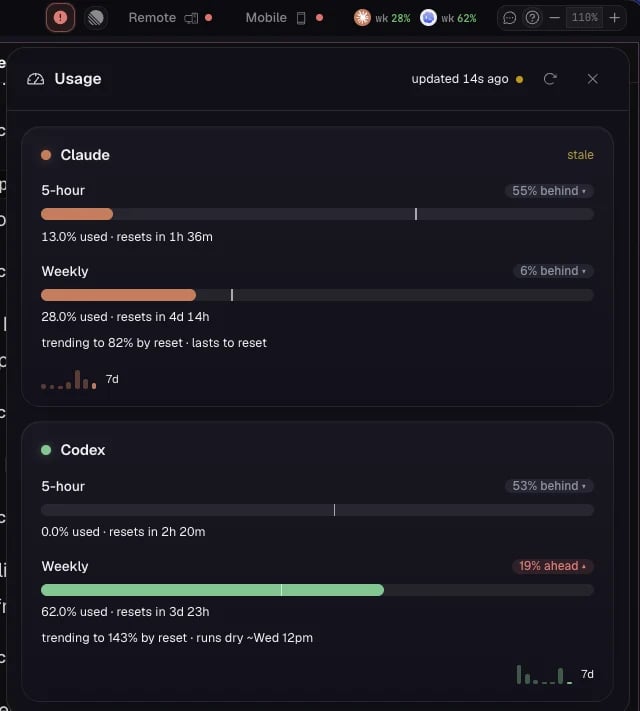
Running several agents in parallel can spend quickly. Use cheaper models for routine follow-up and stronger models for planning, architecture, and hard debugging. The top-bar **Usage** popup shows live provider quota windows and lets you set a budget cap; **Settings → Stats** is the retrospective view of token, cost, and GitHub activity.
 ## Troubleshooting
If OpenCode is blocked by macOS Gatekeeper, its diagnostics report a quarantined binary and the exact fix — clear the quarantine attribute with `xattr -d com.apple.quarantine ` (the card shows the full path), then re-check.
Run the login command the card suggests, then hit **Refresh**. If a CLI is installed but not found, make sure it is on the shell PATH that ADE launches from.
Provider calls go directly from your machine to the provider or local endpoint you configure. Keep keys out of committed files — ADE stores them in local encrypted settings.
Lane scope, provider modes, and how secrets are handled.
Every Settings section and a first-pass order.
## Troubleshooting
If OpenCode is blocked by macOS Gatekeeper, its diagnostics report a quarantined binary and the exact fix — clear the quarantine attribute with `xattr -d com.apple.quarantine ` (the card shows the full path), then re-check.
Run the login command the card suggests, then hit **Refresh**. If a CLI is installed but not found, make sure it is on the shell PATH that ADE launches from.
Provider calls go directly from your machine to the provider or local endpoint you configure. Keep keys out of committed files — ADE stores them in local encrypted settings.
Lane scope, provider modes, and how secrets are handled.
Every Settings section and a first-pass order.


