> ## Documentation Index
> Fetch the complete documentation index at: https://ade-ac1c6011-dependabot-github-actions-actions-cache-6.mintlify.site/llms.txt
> Use this file to discover all available pages before exploring further.
# Settings
> The real ADE settings tabs, a recommended first pass, and the first-run setup that detects your stack.
Settings is where you connect providers, link GitHub and Linear, tune how ADE looks and behaves, and shape how lanes are created. It's organized by the kind of thing you're changing, not by which service backs it.
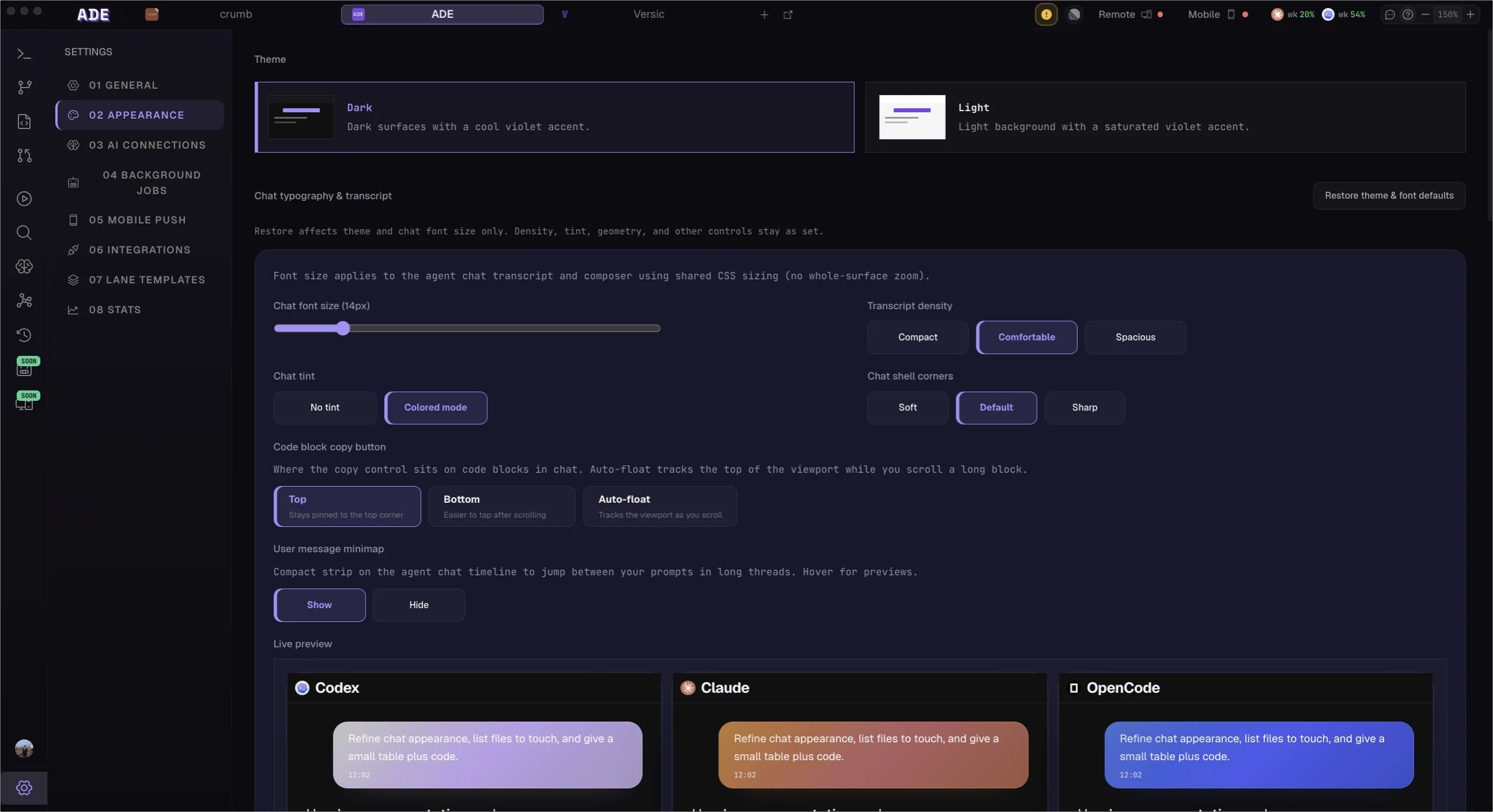 ## The tabs
AI mode, task routing, terminal preferences, keybindings, project setup re-entry, and the `ade` CLI install / health surface.
Theme, chat density and font size, code-block options, completion sound, and voice dictation.
Provider CLIs, sign-in and API keys, model availability, and provider readiness for the five agents.
Lightweight AI helpers: auto-naming chats and lanes, summarizing finished work, and drafting PR and commit messages.
GitHub, Linear, and the `ade` CLI integration tabs.
Lane initialization recipes and lifecycle policies — what new lanes set up, and when old ones get cleaned up.
A retrospective dashboard: local AI token / cost summaries and GitHub-backed PR, commit, and code-movement totals.
A few controls live in the **top bar**, not in Settings: live provider quota windows and the automation budget sit in the **Usage** popup, and phone pairing and multi-device sync sit in the **Sync** popover. Settings → Stats is the retrospective view; the Usage popup is the live one.
## First-run setup
When you open a project for the first time, ADE shows a setup dashboard — a single page of status cards rather than a blocking step-by-step wizard. It detects your stack and suggests config so you don't have to write it by hand:
* **Developer tools** — checks for `git` and the GitHub CLI.
* **Stack detection** — looks for `package.json`, `Cargo.toml`, `go.mod`, `pyproject.toml`, a `Makefile`, `docker-compose`, and `.github/workflows/`, then suggests processes, test commands, and stacks.
* **AI runtimes** — a compact band to set up Claude, Codex, Cursor, Factory Droid, and OpenCode.
* **GitHub and Linear** — optional cards for repository auth and Linear connection.
* **Existing worktrees** — import git branches you already have as lanes in one click.
Nothing here blocks you. You can skip any card and re-run setup later from **General**.
## Recommended first pass
Only the first step is required to start running agents — the rest unlock GitHub, Linear, and mobile workflows.
In **AI Connections**, make sure at least one of Claude Code, Codex, Cursor, Factory Droid, or OpenCode is green. That's all you need to start a lane chat.
Do this for PR creation, CI state, comments, and merge workflows.
Do this if issues should link to lanes, CTO work, and PR updates.
From the top-bar **Sync** popover, reveal the pairing PIN to bring agent work and PR activity to iOS.
Check the top-bar **Usage** popup and set a budget cap before running many agents in parallel.
## Shared vs. local config
ADE splits project configuration into two files: shared, version-controlled team config (`.ade/ade.yaml`) and a per-user, gitignored overlay (`.ade/local.yaml`). Saving shared config triggers a trust confirmation, since shared settings can introduce commands that run on every teammate's machine. Anything with a secret — provider keys, GitHub and Linear tokens — stays in a local encrypted store and is never committed.
Connect each agent, set permission presets, and control cost.
Where ADE stores local state and what to keep out of Git.
## The tabs
AI mode, task routing, terminal preferences, keybindings, project setup re-entry, and the `ade` CLI install / health surface.
Theme, chat density and font size, code-block options, completion sound, and voice dictation.
Provider CLIs, sign-in and API keys, model availability, and provider readiness for the five agents.
Lightweight AI helpers: auto-naming chats and lanes, summarizing finished work, and drafting PR and commit messages.
GitHub, Linear, and the `ade` CLI integration tabs.
Lane initialization recipes and lifecycle policies — what new lanes set up, and when old ones get cleaned up.
A retrospective dashboard: local AI token / cost summaries and GitHub-backed PR, commit, and code-movement totals.
A few controls live in the **top bar**, not in Settings: live provider quota windows and the automation budget sit in the **Usage** popup, and phone pairing and multi-device sync sit in the **Sync** popover. Settings → Stats is the retrospective view; the Usage popup is the live one.
## First-run setup
When you open a project for the first time, ADE shows a setup dashboard — a single page of status cards rather than a blocking step-by-step wizard. It detects your stack and suggests config so you don't have to write it by hand:
* **Developer tools** — checks for `git` and the GitHub CLI.
* **Stack detection** — looks for `package.json`, `Cargo.toml`, `go.mod`, `pyproject.toml`, a `Makefile`, `docker-compose`, and `.github/workflows/`, then suggests processes, test commands, and stacks.
* **AI runtimes** — a compact band to set up Claude, Codex, Cursor, Factory Droid, and OpenCode.
* **GitHub and Linear** — optional cards for repository auth and Linear connection.
* **Existing worktrees** — import git branches you already have as lanes in one click.
Nothing here blocks you. You can skip any card and re-run setup later from **General**.
## Recommended first pass
Only the first step is required to start running agents — the rest unlock GitHub, Linear, and mobile workflows.
In **AI Connections**, make sure at least one of Claude Code, Codex, Cursor, Factory Droid, or OpenCode is green. That's all you need to start a lane chat.
Do this for PR creation, CI state, comments, and merge workflows.
Do this if issues should link to lanes, CTO work, and PR updates.
From the top-bar **Sync** popover, reveal the pairing PIN to bring agent work and PR activity to iOS.
Check the top-bar **Usage** popup and set a budget cap before running many agents in parallel.
## Shared vs. local config
ADE splits project configuration into two files: shared, version-controlled team config (`.ade/ade.yaml`) and a per-user, gitignored overlay (`.ade/local.yaml`). Saving shared config triggers a trust confirmation, since shared settings can introduce commands that run on every teammate's machine. Anything with a secret — provider keys, GitHub and Linear tokens — stays in a local encrypted store and is never committed.
Connect each agent, set permission presets, and control cost.
Where ADE stores local state and what to keep out of Git.