> ## Documentation Index
> Fetch the complete documentation index at: https://ade-ac1c6011-dependabot-github-actions-actions-cache-6.mintlify.site/llms.txt
> Use this file to discover all available pages before exploring further.
# Linear
> Linear is a first-class, two-way integration owned by the CTO — attach issues to lanes and chats, sync status, and run issues end to end with workflow presets.
Linear is a first-class, two-way integration, owned by the CTO. Connect it when your planning and review loop already runs through Linear issues — then you can attach issues to lanes and chats, keep status in sync, and let the CTO triage an issue, delegate the work, open a PR, and close the issue back out.
## What the integration does
Connect a Linear issue to a lane or chat. ADE derives the branch name and attaches the issue as context.
Connected lanes prefix commits with the issue reference and seed the PR title and body so Linear links the work back.
As work moves, ADE updates the issue and posts progress and closeout notes.
Define workflows that dispatch a matching issue to a session, a worker, or a PR resolution — automatically.
## Connect Linear
You can connect from **CTO → Workflows** or **Settings → Integrations**. There are two paths:
The primary path. ADE opens a Linear sign-in and stores the resulting token, refreshing it for you. The sign-in session is short-lived, so finish it promptly.
The alternative — paste a key that doesn't expire. Good for headless or automated setups.
Pick which Linear projects ADE watches and which states count as active vs. terminal.
Attach an issue to a lane and confirm it shows up in the lane and in CTO context.
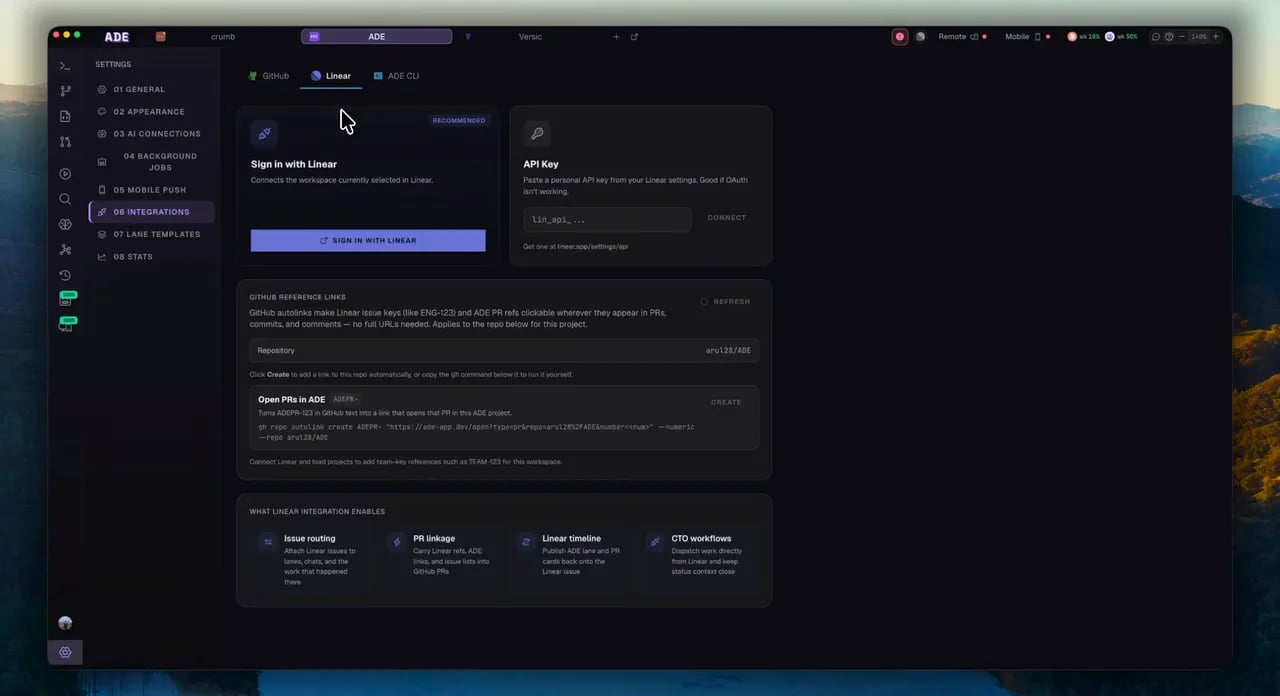 Until a token is stored, the whole integration stays dormant — nothing polls, nothing binds, no background work runs. Connecting is a deliberate act.
## The CTO-driven Linear loop
Once Linear is connected, a workflow can run a whole issue end to end. The shape is the same every time.
A new or updated issue is matched against your workflows by trigger — assignee, labels, team, project, priority, or state transition.
The matched workflow dispatches the work as an employee session, a worker run, or a PR resolution, with the issue attached as context.
The agent implements in its lane, then commits, pushes, and opens a PR — linked back to the issue.
On completion, ADE transitions the issue's state, posts a summary comment, and attaches proof artifacts.
### Workflow targets
A workflow dispatches an issue to one of four targets. Workflows can also chain stages — a worker run feeding into a PR resolution, say.
| Target | What it launches |
| ---------------- | --------------------------------------------------------- |
| Employee session | A CTO or employee chat with the issue as context. |
| Worker run | A delegated worker run in a fresh lane. |
| PR resolution | A PR-focused resolver session. |
| Review gate | A human review pause — no work launched until you decide. |
The CTO owns Linear issue intake. [Automations](/tools/automations) can react to Linear events for their own context, but they never duplicate this routing — the CTO is the canonical path.
### Human review and delegation
Workflows can insert a review gate so a run pauses for your approval before it continues or lands a PR. And if a workflow can't resolve an issue's assignee to a known worker, the run waits in **awaiting delegation** with a dropdown to assign it — it never dispatches to an invalid target.
## Good CTO prompts with Linear
```text theme={null}
Read ENG-142 and propose a lane plan with acceptance criteria.
```
```text theme={null}
Summarize what changed on the PR linked to ENG-142 and draft a Linear update.
```
```text theme={null}
Which Linear issues are blocked by current PR or CI state?
```
Pick a persona and model, connect GitHub and Linear, and add workers.
Manage the scoped agents that run worker-target Linear workflows.
Until a token is stored, the whole integration stays dormant — nothing polls, nothing binds, no background work runs. Connecting is a deliberate act.
## The CTO-driven Linear loop
Once Linear is connected, a workflow can run a whole issue end to end. The shape is the same every time.
A new or updated issue is matched against your workflows by trigger — assignee, labels, team, project, priority, or state transition.
The matched workflow dispatches the work as an employee session, a worker run, or a PR resolution, with the issue attached as context.
The agent implements in its lane, then commits, pushes, and opens a PR — linked back to the issue.
On completion, ADE transitions the issue's state, posts a summary comment, and attaches proof artifacts.
### Workflow targets
A workflow dispatches an issue to one of four targets. Workflows can also chain stages — a worker run feeding into a PR resolution, say.
| Target | What it launches |
| ---------------- | --------------------------------------------------------- |
| Employee session | A CTO or employee chat with the issue as context. |
| Worker run | A delegated worker run in a fresh lane. |
| PR resolution | A PR-focused resolver session. |
| Review gate | A human review pause — no work launched until you decide. |
The CTO owns Linear issue intake. [Automations](/tools/automations) can react to Linear events for their own context, but they never duplicate this routing — the CTO is the canonical path.
### Human review and delegation
Workflows can insert a review gate so a run pauses for your approval before it continues or lands a PR. And if a workflow can't resolve an issue's assignee to a known worker, the run waits in **awaiting delegation** with a dropdown to assign it — it never dispatches to an invalid target.
## Good CTO prompts with Linear
```text theme={null}
Read ENG-142 and propose a lane plan with acceptance criteria.
```
```text theme={null}
Summarize what changed on the PR linked to ENG-142 and draft a Linear update.
```
```text theme={null}
Which Linear issues are blocked by current PR or CI state?
```
Pick a persona and model, connect GitHub and Linear, and add workers.
Manage the scoped agents that run worker-target Linear workflows.