> ## Documentation Index
> Fetch the complete documentation index at: https://ade-ac1c6011-dependabot-github-actions-actions-cache-6.mintlify.site/llms.txt
> Use this file to discover all available pages before exploring further.
# ade code (terminal)
> ADE, terminal-native. The same lanes, chats, and PRs in a fast TUI you can drive over SSH.
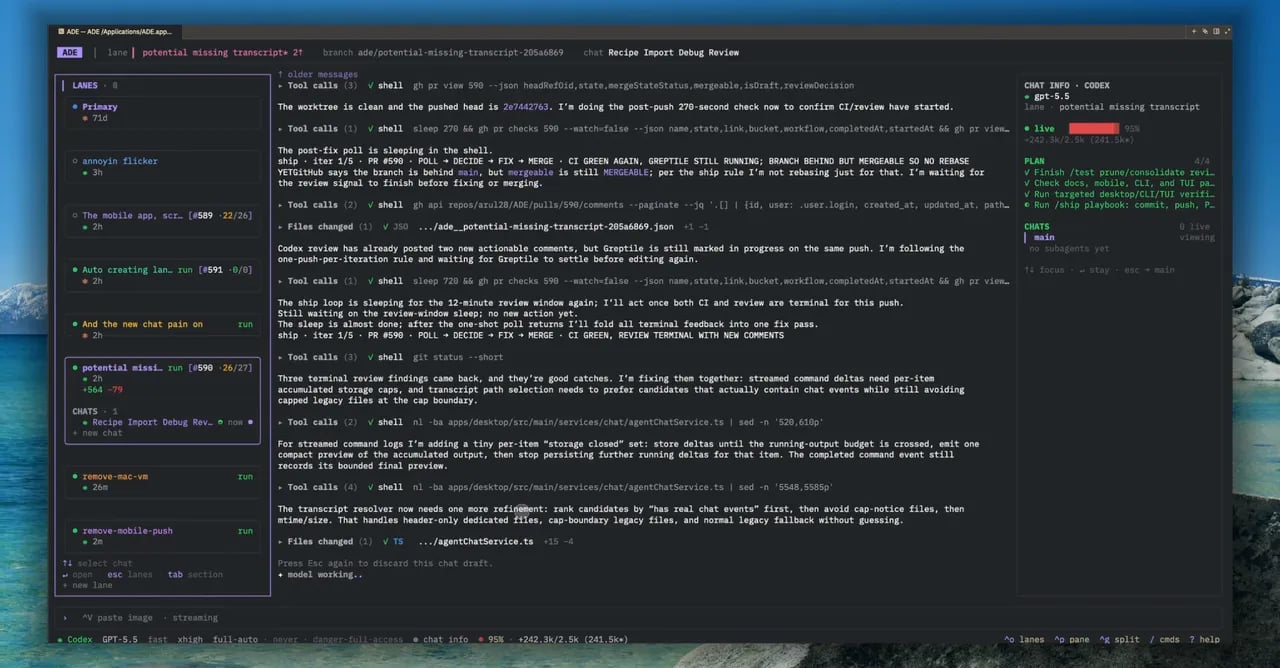
`ade code` is ADE in your terminal — the same lanes, chats, and PRs as the desktop app, rendered as a fast TUI. It attaches to the same machine, so a chat you start in the terminal shows up on the desktop and your phone, and vice versa. Start in the shell, finish anywhere.
## Launch it
```bash theme={null}
ade code
```
That attaches to your machine's ADE runtime and opens the workspace. From there you get a lane and chat drawer, a chat pane, and a side pane for PR details, lane info, the model picker, and Linear status.
 ## What you can do
Start and steer chats with any provider, watch tool calls stream, and approve diffs.
Create, switch, and inspect lanes without leaving the keyboard.
Commit, push, and open PRs with slash commands; check CI from the side pane.
Run it on a remote box and drive ADE entirely from a terminal session.
## Slash commands
Most actions have a slash command. A few of the common ones:
| Command | Does |
| ----------- | ------------------------------------------- |
| `/new lane` | Create a new lane |
| `/model` | Open the provider and model picker |
| `/commit` | Stage and commit the lane's changes |
| `/push` | Push the lane's branch |
| `/pr` | Open a pull request from the lane |
| `/linear` | Attach or update a Linear issue |
| `/info` | Show plan steps, token usage, and PR status |
Type `/` in the composer to see the full list for the current session.
`ade code` is a client of the same runtime as the desktop app — it isn't a separate copy of your project. Both read and write the same lanes, transcripts, and PR state.
How chats, providers, and tool calls work.
Point ADE at a repository that lives on another box.
## What you can do
Start and steer chats with any provider, watch tool calls stream, and approve diffs.
Create, switch, and inspect lanes without leaving the keyboard.
Commit, push, and open PRs with slash commands; check CI from the side pane.
Run it on a remote box and drive ADE entirely from a terminal session.
## Slash commands
Most actions have a slash command. A few of the common ones:
| Command | Does |
| ----------- | ------------------------------------------- |
| `/new lane` | Create a new lane |
| `/model` | Open the provider and model picker |
| `/commit` | Stage and commit the lane's changes |
| `/push` | Push the lane's branch |
| `/pr` | Open a pull request from the lane |
| `/linear` | Attach or update a Linear issue |
| `/info` | Show plan steps, token usage, and PR status |
Type `/` in the composer to see the full list for the current session.
`ade code` is a client of the same runtime as the desktop app — it isn't a separate copy of your project. Both read and write the same lanes, transcripts, and PR state.
How chats, providers, and tool calls work.
Point ADE at a repository that lives on another box.