> ## Documentation Index
> Fetch the complete documentation index at: https://ade-ac1c6011-dependabot-github-actions-actions-cache-6.mintlify.site/llms.txt
> Use this file to discover all available pages before exploring further.
# Work sessions
> Agent chats, provider CLIs, plain shells, and managed processes — every Work session is lane-scoped and tracked in one place.
**Work** is where active sessions live. A session can be an agent chat, a provider CLI running in its own terminal, a plain shell you type into, or a managed process started from Run. Whatever kind it is, it's scoped to a lane's worktree and tracked as a durable session — with a transcript, a status, and a clear lane association — so nothing an agent does is anonymous.
## Four kinds of session
Every Work session is the same kind of tracked record under the hood, which is why they all live in one list and one grid.
A chat backed by a provider SDK — Claude Code, Codex, Cursor, Factory Droid, or OpenCode. Streams tool calls and diffs, with approval gates.
The provider's own CLI running inside ADE in a tracked terminal. ADE knows how to resume it, so an ended CLI session can be continued.
A plain interactive shell (a PTY) in the lane's worktree, for running commands by hand.
A dev server or background command launched from [Run](/tools/project-home), with its logs and status surfaced here too.
## Lane scope
Each Work session belongs to a lane and runs in that lane's worktree, with that lane's environment. The same command behaves differently across two lanes, so check the lane label before you type or prompt. Launching a session always resolves the lane's worktree first — sessions can't drift into the wrong directory.
## Tracked, not anonymous
Every session is a row that ADE keeps so you can revisit it later. A session record carries:
* **Identity** — the lane, the tool type, and (for terminals owned by a chat) the parent chat.
* **Intent** — a title and goal, often auto-derived from the first prompt.
* **Lifecycle** — running, completed, failed, disposed, or detached, with start/end times and exit code.
* **Content** — a transcript and a last-output preview.
* **Provenance** — the commit range the session spanned and links to its diff.
Tracked provider CLI sessions also store enough resume metadata that, after one exits, you can **Resume** the TUI or send a follow-up prompt and ADE rebuilds the right `claude --resume`, `codex resume`, or equivalent command — continuing in the same durable session.
## Organize the list, tile the grid
The Work sidebar lists sessions and can group them **by lane**, **by status**, or **by time**, with search and filters. The view area shows them as tabs, a single focused session, or a **grid** of tiled panes so several terminals and chats stay live at once.
Grid view keeps every tile mounted, so multiple agent CLIs or shells run side by side without detaching. Arrange them Auto, Rows, or Columns from the grid menu.
## Tools alongside the session
A right-edge sidebar follows the active lane and Work session, with tabs for **Git**, **Files**, the **iOS Simulator**, **App Control**, and the **Browser**. Pick an element in the browser or simulator and it's inserted as context into the active chat, draft, or agent CLI — so the agent works against exactly what you're looking at.
## The same sessions in the terminal
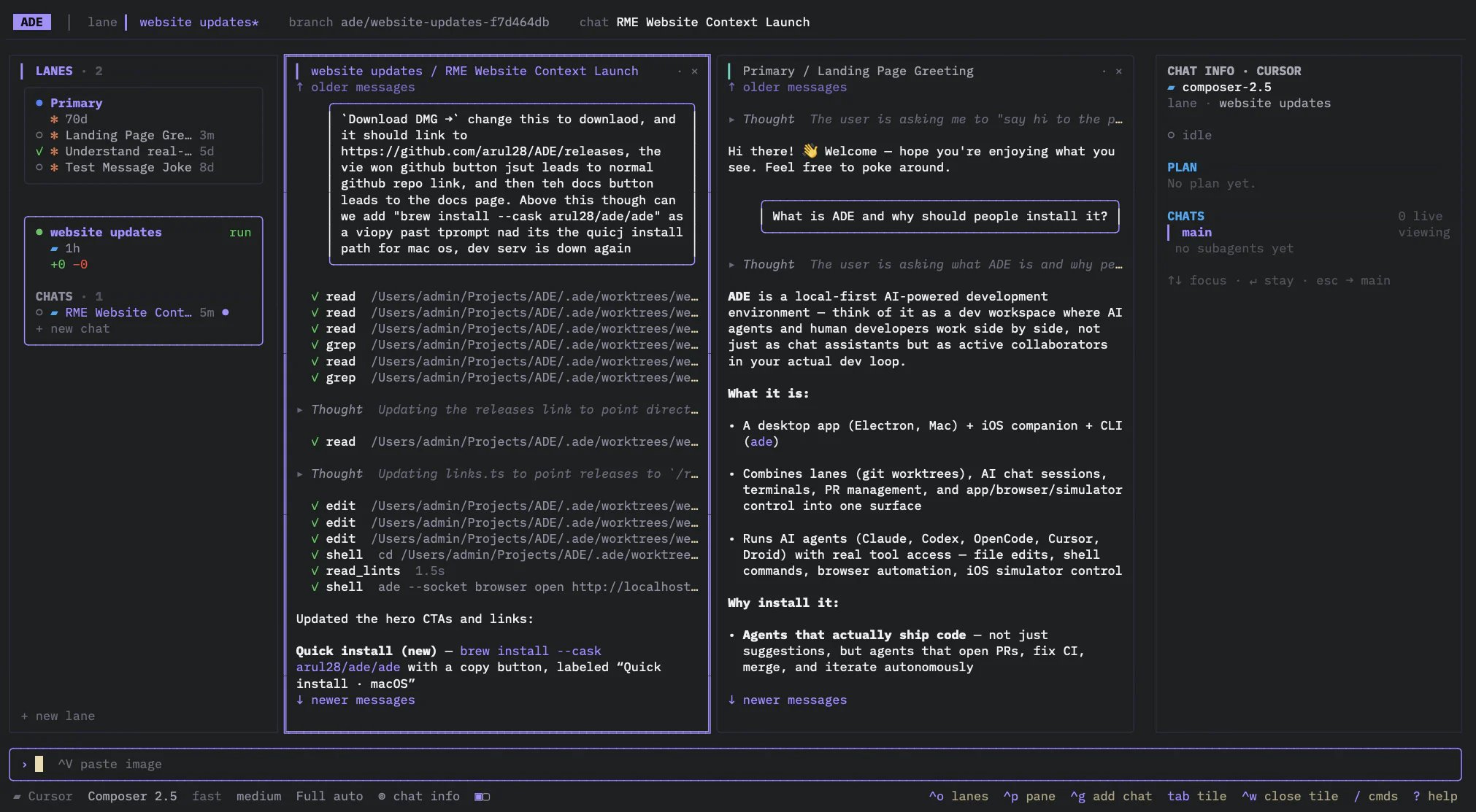
Work sessions aren't desktop-only. `ade code` attaches to the same machine and renders the same lanes, chats, and PRs as a fast TUI — start a session on the desktop and pick it up in the shell, or the other way around.
 ## Recovery
If ADE restarts, it reconciles each session against the process that owns it: live sessions owned by another window or the daemon are left alone, while genuinely orphaned ones are marked detached. The durable row and transcript always remain, so even a session whose process is gone stays readable in [History](/tools/history).
The same lanes, chats, and sessions in a fast TUI.
Define and manage dev servers and test commands per lane.
## Recovery
If ADE restarts, it reconciles each session against the process that owns it: live sessions owned by another window or the daemon are left alone, while genuinely orphaned ones are marked detached. The durable row and transcript always remain, so even a session whose process is gone stays readable in [History](/tools/history).
The same lanes, chats, and sessions in a fast TUI.
Define and manage dev servers and test commands per lane.